How to manage
your small business finances with Bluevine accounting
Get actionable financial insights and streamlined accounting in your Bluevine dashboard, with Bluevine accounting powered by Xero.

What is Bluevine’s accounting software for small businesses?
Bluevine accounting is accounting software for small businesses, built into your Bluevine Business Checking account. Powered by Xero, Bluevine accounting brings your revenue and expense management into your Bluevine dashboard, so your accounting and banking can all happen in one place. With Bluevine accounting, you can connect all your business accounts, including credit cards and non-Bluevine accounts, to track revenue and spend, automate transaction categorization, and run financial reports without switching tools.
How Bluevine accounting helps you manage your
finances all in one place
Track and manage everything in one place
Transactions automatically sync to your accounting view, so you don’t need to manually import or reconcile data across multiple tools.
Save time with automated categorization
With suggested categories and a streamlined interface, categorization is quick and easy, saving you time and keeping you ready for tax season.
Understand cash flow
You can see money coming in and going out across all your business accounts, helping you avoid surprises.
Run financial reports
Financial reports, such as profit and loss statements, generate as you begin categorization, helping you monitor the financial health of your business.
Identify top customers and vendors
With a list of your most frequent customers and vendors, you can understand where your revenue comes from—and where your spending goes.
Manage multiple accounts in one ledger
You can connect non-Bluevine accounts, including credit cards, and view everything in one place for a complete financial picture.


How to categorize transactions
Transaction categorization is one of the most important parts of business accounting—and a key part of effective financial management. It’s also often the most time-consuming. With Bluevine accounting, categorization is quick and easy—and it automates over time.
How to categorize transactions:
- Navigate to the Accounting → Transactions tab in your dashboard
- Fill in the To/From field to identify who the transaction is associated with
- Create or choose a category such as rent, supplies, or payroll
- Confirm the transaction
Categorization will get faster and more automated over time. Once categorized, the system records the information and begins learning your patterns. For future similar transactions, we’ll fill in the details for you, so all you’ll need to do is click Confirm.

Why categorizing your transactions matters:
Categorization is what turns raw transactions into meaningful financial data. Without it, transactions are just a date, an amount, and an unhelpful bank description, meaning reports won’t reflect your actual business performance. Accurate categorization is also essential for a painless tax season. Bluevine accounting streamlines categorization to save you time and make managing transactions a breeze.
How to run financial reports
Reports begin generating as soon as you start categorizing transactions.
View reports directly from your dashboard:
- Navigate to the Accounting → Reports tab
- Choose the report you want to view
Types of financial reports
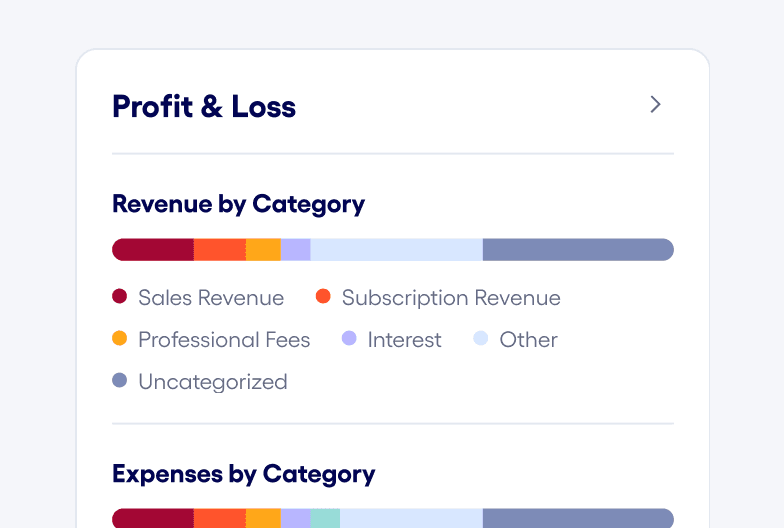
Profit and loss report
- Shows revenue, expenses, and net profit over a period
- Use it to understand profitability and leverage for year-end tax filings
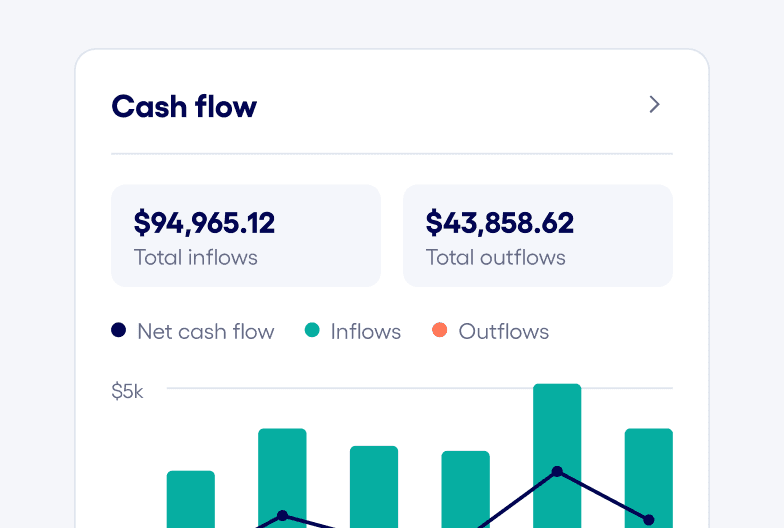
Cash flow report
- Tracks money entering and leaving your business
- Use it to monitor liquidity and avoid shortfalls
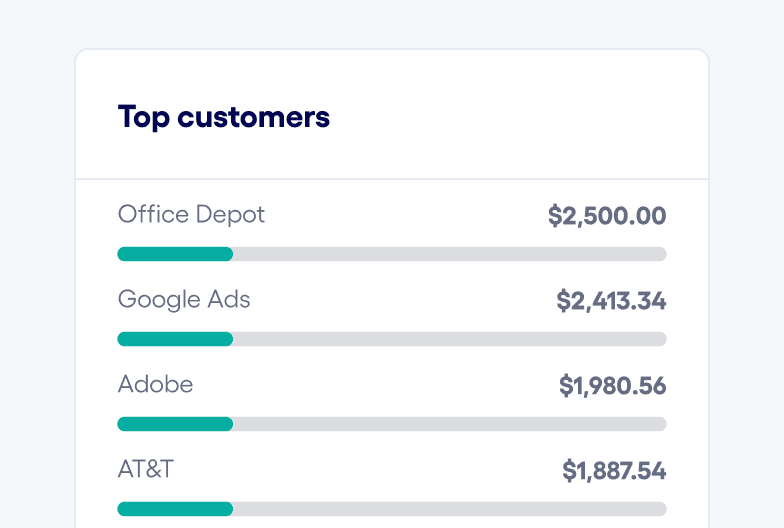
Top customers and payees
- Highlights your biggest revenue sources and largest expenses
- Use it to identify trends and make informed decisions
These reports are generated from your categorized transactions—so they’re always up to date and tailored to your business.
What businesses benefit most from Bluevine accounting?
Bluevine accounting is designed for businesses that want a simpler way to manage their finances, track expenses, and understand business performance. It can be especially useful for businesses moving beyond spreadsheets, owners managing finances themselves, and businesses looking for essential financial reporting without adding another tool to their workflow. At just $12 per month, Bluevine accounting is an affordable option compared to other accounting software, making it easier for businesses to access the essential accounting tools they need, minus the bells and whistles they don’t.
Businesses using spreadsheets
If you’re manually tracking finances using spreadsheets, accounting within Bluevine reduces repetitive work.
Owners managing finances themselves
You don’t need accounting expertise to get value from categorization and financial reporting. Bluevine accounting helps you stay on top of transactions through streamlined categorizations, saving you time and keeping you organized for tax season.
Owners managing finances with the help of an accountant
Transaction categorization is the foundation of reliable financial reporting. Bluevine accounting makes it faster and easier to categorize spend, so businesses can share accurate financial information and reports with their accountants.
Businesses in need of essential financial visibility
If your needs are focused on saving time tracking, reporting, and getting visibility for tax season, Bluevine accounting covers the essentials while running reports tailored to your business.


Ready to get started?
Bluevine accounting works best for your business when your account is fully set up. To get accurate reporting and unlock the most value out of Bluevine accounting, follow these tips:
- Connect all your business accounts, including non-Bluevine accounts and credit cards
- Categorize recent transactions to help the system learn your spending patterns and begin automating categorization
- Review suggested categories and confirm categorized transactions
- Start running financial reports to monitor cash flow and understand business performance

Explore Bluevine accounting with a free trial
After your free trial period, you can get Bluevine accounting powered by Xero for $12 per month.BVSUP-00181
- Standard1 month free
- Plus3 months free
- Premier3 months free


Have more complex accounting needs?
We also offer a free trial of a Xero plan.BVSUP-00207
Frequently asked questions
Bluevine accounting is accounting software for small business, powered by Xero that’s built into your Bluevine business checking account. With Bluevine accounting, you can track your business finances without needing separate tools—your transactions, expenses, and reports live in one place.
Bluevine accounting handles the bookkeeping most small businesses typically need, such as tracking what you’ve earned and spent, categorizing income and expenses, and generating the reports you and/or your accountant need at tax time.
With Bluevine, you can connect all your business accounts to automatically pull in transactions and categorize them over time. The system learns your transactions as you categorize, so it gets smarter and more accurate the more you use it. For example, if you tag a recurring payment as “rent,” future transactions of the same type will be categorized automatically—saving you time and reducing manual work.
Bluevine accounting reduces manual work, eliminates the need for multiple tools, and provides a clearer view of your business finances. By bringing expense management, categorization, and reporting into one place, it helps small business owners spend less time managing data and more time running their business.
No, for many businesses, Bluevine accounting can replace standalone accounting software. Bluevine accounting is a great tool for businesses that need to track revenue and expenses, categorize transactions, and run essential financial reports such as P&L statements and cash flow statements. With Bluevine accounting, small businesses with straightforward accounting needs can handle their banking and accounting in one place.
If your business requires advanced features like W-9 or 1099 management, project time and expense tracking, and multi-currency support, you may choose to go with a dedicated accounting platform or other tax tool outside of Bluevine. For example, a small retail shop might manage everything inside Bluevine with a separate 1099 management tool, while a larger company may use a standalone accounting system.
Transaction categorization is the process of labeling expenses (like rent or payroll) and revenue (like sales or services) so you can track how your business is actually doing and where your money is going. Consistent categorization is a crucial part of accounting for small businesses, as it helps you prepare for tax time, stay organized, and understand your financial health.
As you categorize transactions, Bluevine’s accounting software will learn patterns and suggest categories for future transactions. You’ll always be able to review and approve categorized transactions to ensure accuracy.
Yes, you can connect all your external business accounts, including credit card accounts, and view all their transactions in one ledger.
You can start categorizing transactions after you set up accounting in your dashboard. To get started:
- Add your business accounts
- Start categorizing your transactions
- Run financial reports
With Bluevine, transaction categorization is quick and easy. After initial set-up, you can start categorizing right away. Categorizing just a few transactions at the start makes it easier for the system to learn your expenses and start automatically categorizing for you. Then once enough transactions are categorized, you’ll unlock financial reports for your business.
To get started using Bluevine accounting powered by Xero, follow these steps:
- Apply for a Bluevine Business Checking account
- Activate accounting from your dashboard
- Begin categorizing transactions to unlock financial reports
After your free trial period, you can continue to access accounting for $12 per month.BVSUP-00181 The $12 per month price point makes it an affordable option compared to standalone accounting software.
Trial period:
- Standard: 1 month
- Plus: 3 months
- Premier: 3 months
Ready to bring banking
and accounting
together?
Open a Bluevine Business Checking account to get started.