
According to the FBI’s annual Internet Crime Report, its Internet Crime Complaint Center (IC3) received over 1 million total complaints in 2025. Of those million, 191,561 were phishing or spoofing attacks.
This was by far the most reported crime category—more than double the second-place category, extortion (89,129)—and while the number of phishing/spoofing complaints is down since its all-time high in 2023, related losses are up 1,052% in that same time, totaling over $215 million in 2025.
As businesses, institutions, and individuals increasingly rely on digital communications, the danger of spoofing attacks has increased, proliferating to such a degree that scammers successfully spoofed the IC3 website last year, intercepting visitors who wished to submit a cybercrime complaint.
Thankfully, protecting your business from spoofing attacks requires next to no financial investment. This article will teach you a few simple habits, including how to recognize a spoofed message, verify emails and websites, and avoid getting scammed.
Spoofing attacks: In a nutshell
- Throughout this decade, phishing/spoofing has been the most-reported type of cybercrime in the United States. Related losses exceeded $215M in 2025, a more than 1000% increase since 2023.
- In a spoofing attack, scammers digitally disguise themselves to trick you into sharing private information. Commonly spoofed communications include email, website, and caller ID.
- To protect yourself from spoofing attacks, make it routine to verify sender email domains, hyperlink URLs, and TLS certificates before sharing private information.
- If you suspect a spoofing attack: Change all passwords, save all relevant communications, freeze any compromised accounts, and report the incident to the Internet Crime Complaint Center.

What spoofing is and how it’s related to phishing
In its most basic sense, spoofing is the act of disguising your digital communications as coming from a different entity. While this can be done legitimately—for example, a whistleblower might disguise their phone number when submitting an anonymous tip—”spoofing” is commonly used as shorthand for spoofing attacks, or spoofing done with malicious intent.
In a spoofing attack, a scammer disguises their message, IP address, or webpage as being from a trusted entity to trick you into providing sensitive sign-in credentials or banking information. In this scenario, the act of disguise is called spoofing, while the act of using spoofed materials to elicit private information is called phishing.
Types of spoofing attacks
The types of spoofing attack are named after the type of digital disguise being used:
- Email spoofing: Phishing emails that use a deceitful sender name, email address, or design. These emails may contain downloadable malware or links to a spoofed website.
- Website spoofing and domain name spoofing: Fraudulent websites designed to mimic familiar web design, so that visitors are fooled into entering personal information. Domain names may use homoglyphs, or characters that appear identical, to appear legitimate.
- Caller ID and SMS spoofing: Calls and texts disguised as coming from different phone numbers (often from your area code). If you call these numbers back, you’ll be redirected to the real phone associated with that number.
- IP address: Modifying a computer’s IP address to make it appear as if web traffic is coming from a different device or network. This can allow access to networks that are protected by IP-based security.
- DNS spoofing: DNS (Domain Name System) is a protocol that translates domain names into IP addresses. DNS spoofing is a hack in which a website’s URL is made to redirect traffic to a different, spoofed website.
Common homoglyphs used in URL spoofing
| Upper case i and lower case L | ⟨I⟩ vs ⟨l⟩ |
| Zero and upper case O | ⟨0⟩ vs ⟨O⟩ |
| Accented vowels | ⟨а⟩ vs ⟨а́⟩, ⟨e⟩ vs ⟨е́⟩, ⟨i⟩ vs ⟨і́⟩, ⟨o⟩ vs ⟨о́⟩, ⟨u⟩ vs ⟨ú⟩, ⟨y⟩ vs ⟨у́⟩ |
| Umlauted vowels | ⟨а⟩ vs ⟨ä⟩, ⟨o⟩ vs ⟨ö⟩, ⟨u⟩ vs ⟨ü⟩ |
| Armenian alphabet | ⟨ս⟩ vs ⟨u⟩ |
| Cyrillic alphabet | ⟨а⟩ vs ⟨a⟩, ⟨с⟩ vs ⟨c⟩ |
| Multi-letter homoglyphs | ⟨cl⟩ vs ⟨d⟩, ⟨rn⟩ vs ⟨m⟩, ⟨vv⟩ vs ⟨w⟩ |
How a spoofing attack works
Spoofing attacks are a type of social engineering scam: a computer or network hack that succeeds by exploiting human behavior. While specific strategies vary, any successful spoofing attack against a business follows three basic steps:
- The scammer fakes a trustworthy identity. The scammer decides who to phish at your company. They create a spoofed message, website, or caller ID claiming to be from an employee, contractor, vendor, client, applicant, or government agency.
- The scammer tricks the target into interacting. You or your employees receive spoofed communications. The message appears legitimate, and leverages biases or social norms to request information or money. It may also link to a spoofed website or sign-in page.
- The target unwittingly shares personal information or money. The recipient interacts with the spoofed material: they input private information, send a payment, or download malware. The scammer now has access to your business’s network or checking account.
Can you spot the spoofed website?
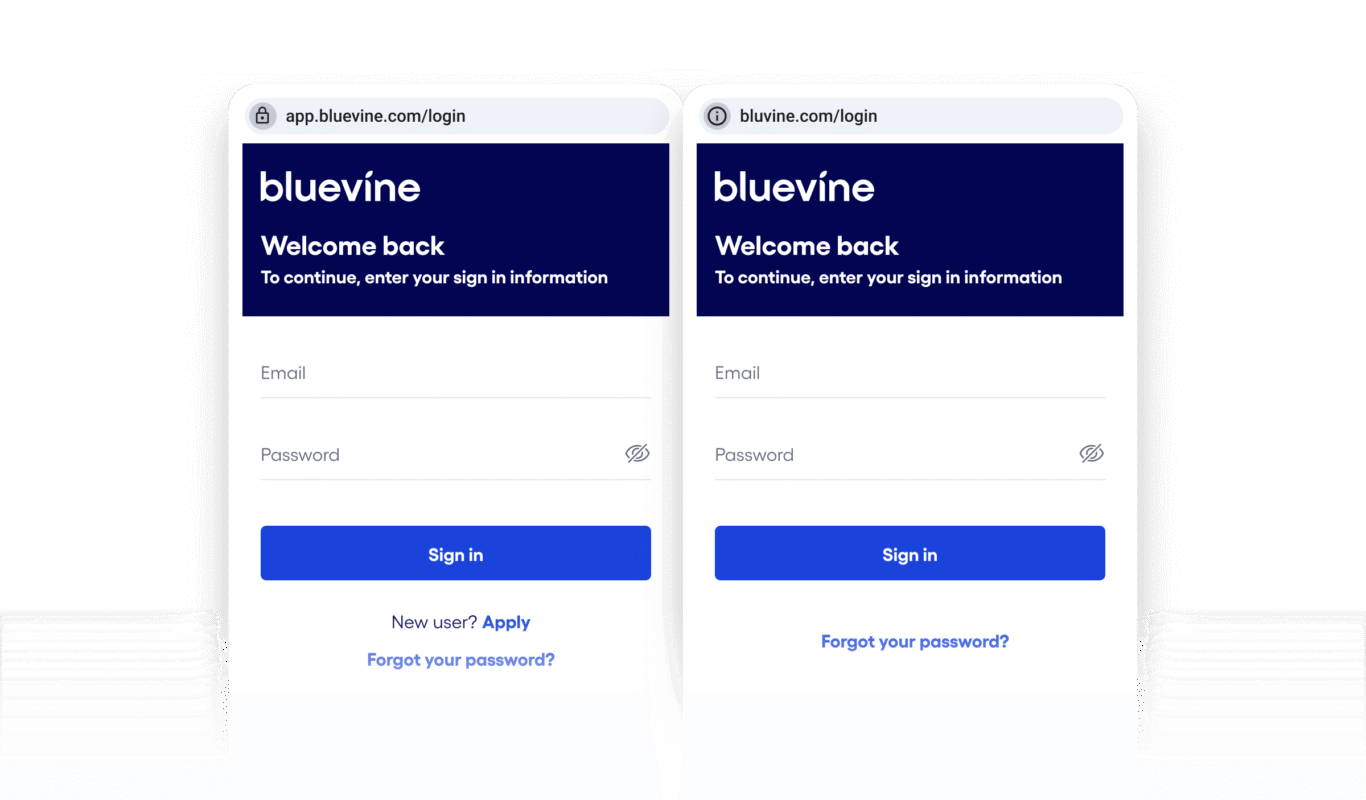
Spoofed websites can be difficult to distinguish at a glance. There are only minor differences between the pages above, and the URLs appear similar at a glance because the right page is using a common misspelling (“Bluevine” without the “e”) to disguise itself. As a final check, we inspect the website’s TLS certificate beside the URL field, which verifies that the left site belongs to Bluevine, Inc.
How to protect your business from spoofing attacks
To start protecting your business from spoofing attacks, review the cybersecurity tips below. Because there are ways to circumvent any one of these measures, it is best to use all or most of them to protect your employees.
Cybersecurity essentials checklist:
❐ Use a password manager to store unique hashes or passphrases for all accounts
❐ Don’t share your passwords or MFA codes
❐ Choose security questions that are difficult for others to verify
❐ Use multiple communication channels at work, especially when working remotely
❐ Only use encrypted communications and business banking platforms
❐ Consider a company VPN plan
❐ Be cautious when sharing employee information on social media
As with other social engineering scams, spoofing attacks rely on human error to succeed. In addition to cybersecurity best practices, train (and re-train) yourself and your employees to practice the following habits:
1. Confirm the message’s sender
Add any verified email addresses and phone numbers to your contacts. When reading emails, verify that the sender’s main email domain matches their organization’s website.
For example, communications from Bluevine will come from an “@bluevine.com” or “@email.bluevine.com” address. If you receive a communication from, say, “@bluevine.support.com,” it is a scam.
If an employee or co-owner contacts you from a new phone number or email address about work-related matters, verify their identity in person or via an established channel before responding. Remember that companies, especially financial platforms, don’t contact you to ask for your username or password.
2. Check the website URL
Never click unsolicited links on a work device, and always inspect a link’s destination before clicking it. Many times, spoofed URLs are obviously doctored, such as “bluevinex-app.sg.” For extra precaution, only access sensitive, frequented accounts via mobile app or browser bookmark.
3. Check the website TLS certificate
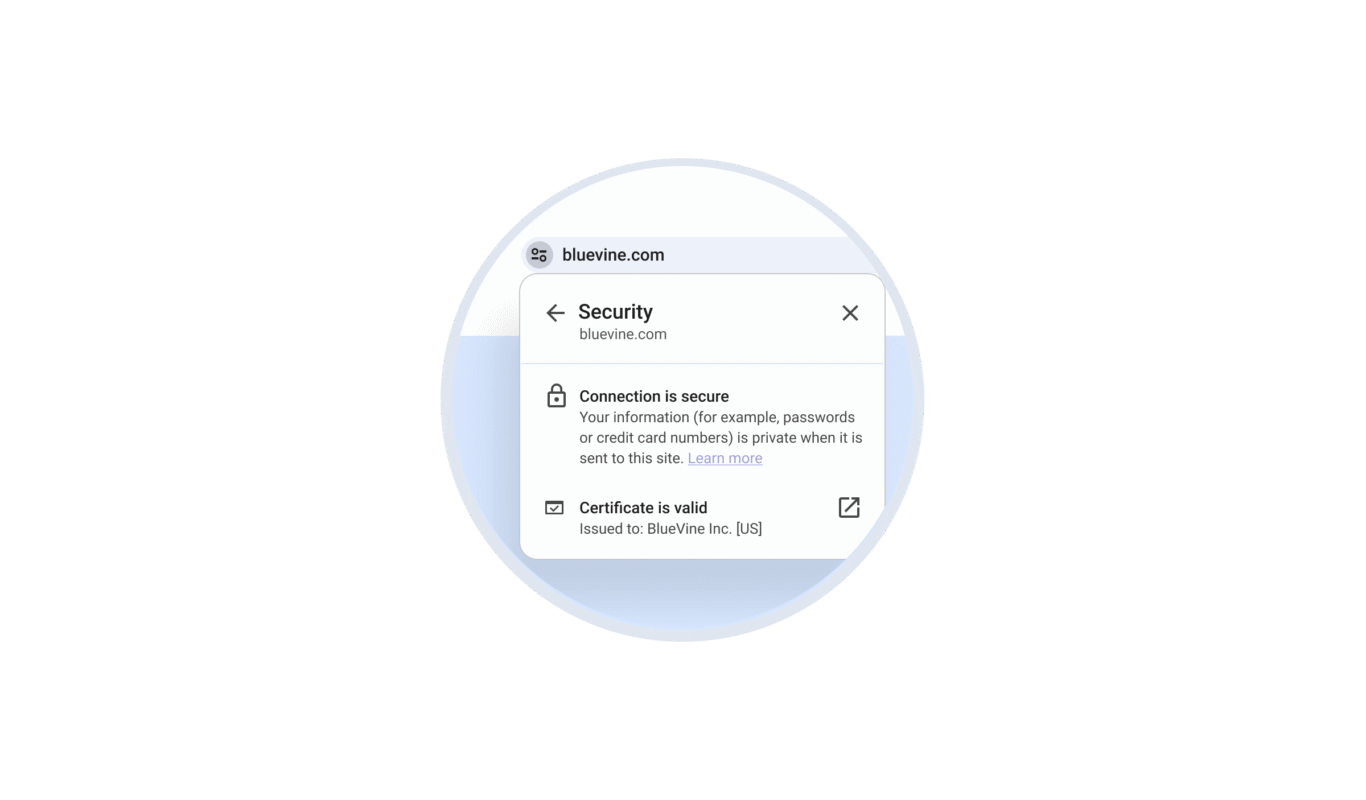
When visiting a website on mobile or desktop, you’ll see an option beside the URL field in your browser to view that site’s security information, including the TLS certificate. A TLS certificate is a digital credential that identifies a website and allows it to encrypt your traffic.
When you check a website’s TLS certificate, confirm that your connection is secure (meaning encrypted), and that the TLS certificate is valid and issued to the website you’re trying to visit.
4. Verify downloads before accepting
Email clients and web browsers have algorithms for warning you about potentially suspicious downloads, but these algorithms are permeable. To further protect yourself, never download unsolicited attachments to a work device, and always double-check the file type of anything you download.
What to do if you suspect a spoofing attack
If you recognize a message as an attempted spoofing attack, simply ignore what it’s asking you to do, delete the message, and block the sender. If the spoofed material was convincing, tip your employees that they may be targeted by a spoofing scam.
If your business has been compromised by a spoofing attack, immediately do the following:
- Use your password manager to change all passwords.
- Keep any communications, call/web history, financial records, or identifying information about the scammer.
- Flag fraudulent financial transactions to your business banking provider and ask them to freeze your account to prevent additional transactions, if they haven’t already taken action.
- Report the incident to the FBI’s Internet Crime Complaint Center.
The role of AI in the future of spoofing attacks
The productivity gains of AI also allow scammers to generate spoofed materials at scale, including websites, email, SMS, voice, and video. Scammers can also purchase your employees’ data from platforms that sell them to advertisers, then use that data to spoof an individual’s behavior and communication style via email, phone, and video.

Did you know?
This year’s Internet Crime Report was the first to dedicate a section to AI-related cybercrimes, reporting tens of thousands of AI-related complaints in 2025 that totaled nearly $900 million in losses.
However, as hacking technologies improve, so do defensive ones. Email providers, cell carriers, and banking providers already use machine learning to flag unusual communications, and their algorithms will continue to become more precise.
But the best way to protect your business from AI-enabled spoofing attacks is to train yourself and your employees to resist social engineering, as outlined above. Verify sensitive requests either in person or via multiple verifiable channels, and avoid using LLMs like ChatGPT to fully write company messages on your behalf, so that it’s harder for scammers to hack or imitate your business.
See all the ways Bluevine protects your account–and what you can do to help.
Spoofing attack FAQs
The word “spoof” was popularized by an English comedian, Arthur Roberts (1852–1933), who claimed in his memoir to have fixated on the word after hearing it was the name of a bluffing game. He created his own game, Spoof, which we know little about other than it was a card game of nonsensical hoaxing. The popularity of Roberts’s game inspired “spoof” (n. and vb.), meaning to lose something because of a bluff or trick. These usages were added to major English dictionaries in 1889.
“Spoof” originated as a term of comedy and deception, and in the twentieth century these aspects diverged into their separate, contemporary usages. In comedy, “spoof” (n. and vb.) has been widely recognized since 1920 as a name for light-hearted satirization. In deception, “spoof” was revived in the 1980s to refer to the then-new class of scam in which hackers disguised their IP addresses to fool others into revealing private information. In this usage, “spoof” (n. and vb.) or “spoofed” (adj.) refers to the bluffed communication itself, rather than the act of losing something that results from it—we call that a “spoofing attack.”
In the 1990s, Netscape Communications developed the SSL (Secure Sockets Layer) protocol for encrypting web traffic on their browser, and released several iterations. Meanwhile, Microsoft iterated on SSL 2.0 to create their own cryptographic protocol for Internet Explorer called PCT (Private Communications Technology) 1.0.
To avoid further siloing web encryption standards by browser, the Internet Engineering Task Force moved to standardize SSL. In 1999, they defined an updated version of SSL 3.0 for use on all web browsers, but changed the name to TLS (Transport Layer Security) 1.0 to avoid the perception they were endorsing one browser developer over another.
While SSL is no longer used, some people and organizations still refer to TLS by the name of its predecessor.
A spoofed email often looks legitimate at first glance, but small details reveal the difference. Check the sender’s full email address (not just the display name), hover over links before clicking, and look for mismatched domains or unusual formatting. Legitimate companies won’t ask for passwords or sensitive information via email. When in doubt, contact the company directly using a verified channel.
Spoofed websites often include subtle inconsistencies, such as misspelled domain names, unusual URL structures, or missing security indicators. Look for HTTPS encryption, verify the TLS certificate, and avoid entering credentials on pages reached through unsolicited links or emails. Even small differences—like swapped letters or extra characters—can indicate a fake site.
Yes, small businesses are frequent targets of spoofing attacks because they often have fewer dedicated security resources. Attackers may impersonate vendors, clients, or financial institutions to request payments or login credentials. Training employees to verify requests, especially those involving money or sensitive data, is one of the most effective defenses against spoofing and phishing attacks.
Spoofing attacks typically lead to loss when a victim unknowingly shares credentials, approves fraudulent payments, or downloads malware. Once attackers gain access to a victim’s financial account, they may transfer funds, steal customer data, or lock systems. Losses can escalate quickly, especially if compromised accounts aren’t secured immediately.
Basic tools can significantly reduce your risk of falling victim to a spoofing attack. These include password managers, multi-factor authentication (MFA), secure business banking platforms, and email filtering systems. Many financial platforms also monitor suspicious activity in real time, helping businesses detect and respond to threats faster.


