
Invoice workflow automation involves using technology to automate the time-consuming, repetitive tasks that come with managing invoices, like data entry.
Instead of manually entering each bill into your records and forwarding email threads around for issue resolution and sign-off, an invoice automation platform can facilitate the process from beginning to end.
In this article, we’ll break down what invoice workflow automation is and how it transforms invoice processing workflows. We’ll also look at the key benefits it brings to small and medium businesses, and the steps you can take to implement it with confidence.
What you need to know
- Invoice workflow automation cuts the tedious busywork out of invoice processing workflows.
- Businesses can realize numerous tangible benefits from invoice workflow automation, from time and cost savings to stronger vendor relationships.

What is invoice workflow automation?
Invoice workflow automation refers to the use of advanced software (often including AI) to automate the work involved in processing invoices from receipt to payment.
This solution reduces the need for manual data entry, improves data accuracy, and improves the efficiency of accounts payable processes overall. For small business owners, this means more time for higher-value work, like serving customers and building marketing campaigns.
Adoption of automated processes is picking up: 29% of small business owners now use AI to automate operations like this, according to the Bluevine 2026 AI Trends Report, and almost half of SMBs using AI save at least four hours a week as a result.
What does an automated invoice workflow look like?
At their core, automated invoice processing and manual invoice processing are just different ways of approaching the same tasks.
However, like with other small business process automations, an automated invoice workflow involves significantly less manual effort. Here’s what it might look like in practice:
Invoice capture and digitization
As soon as the invoice hits your inbox or mailbox, you can feed it into your invoice automation platform. Whether it’s on paper, PDF, image, email, or spreadsheet, the platform can capture and enter the data.
Then, it can format the invoice into your preferred templates and, if necessary, digitize it as a searchable document for your records. This process dramatically reduces how often you need to manually transfer the data from the sender’s documents into your own records and formats.

Did you know?
Bluevine Business Checking helps you automate and elevate your accounts payable processes so you can manage bill pay with ease.
Data extraction and verification
Typically, platforms can extract critical data, like vendor details (name, address, and ID), invoice numbers, totals and subtotals, line items, and payment terms. From there, they can cross-reference this data with your internal records to:
- Flag any anomalies, like unknown vendors, mismatched vendors, or duplicate invoices
- Check the invoice totals against budget limits and approved spending thresholds
- Confirm the invoice’s validity through two-way and three-way matching
| Two-way matching: | Three-way matching: |
|---|---|
| Checking that invoice details align with the corresponding purchase order | Checking that the invoice, purchase order, and goods receipt details align to confirm that the billed goods or services have actually been received |
The system can then flag mismatches and send them to another review, while automatically approving valid invoices for payment depending on your preference.
Rather than reacting to invoicing problems after they happen, you scrutinize them before they become a major issue, potentially saving your business both time and money.
Automated approval routing
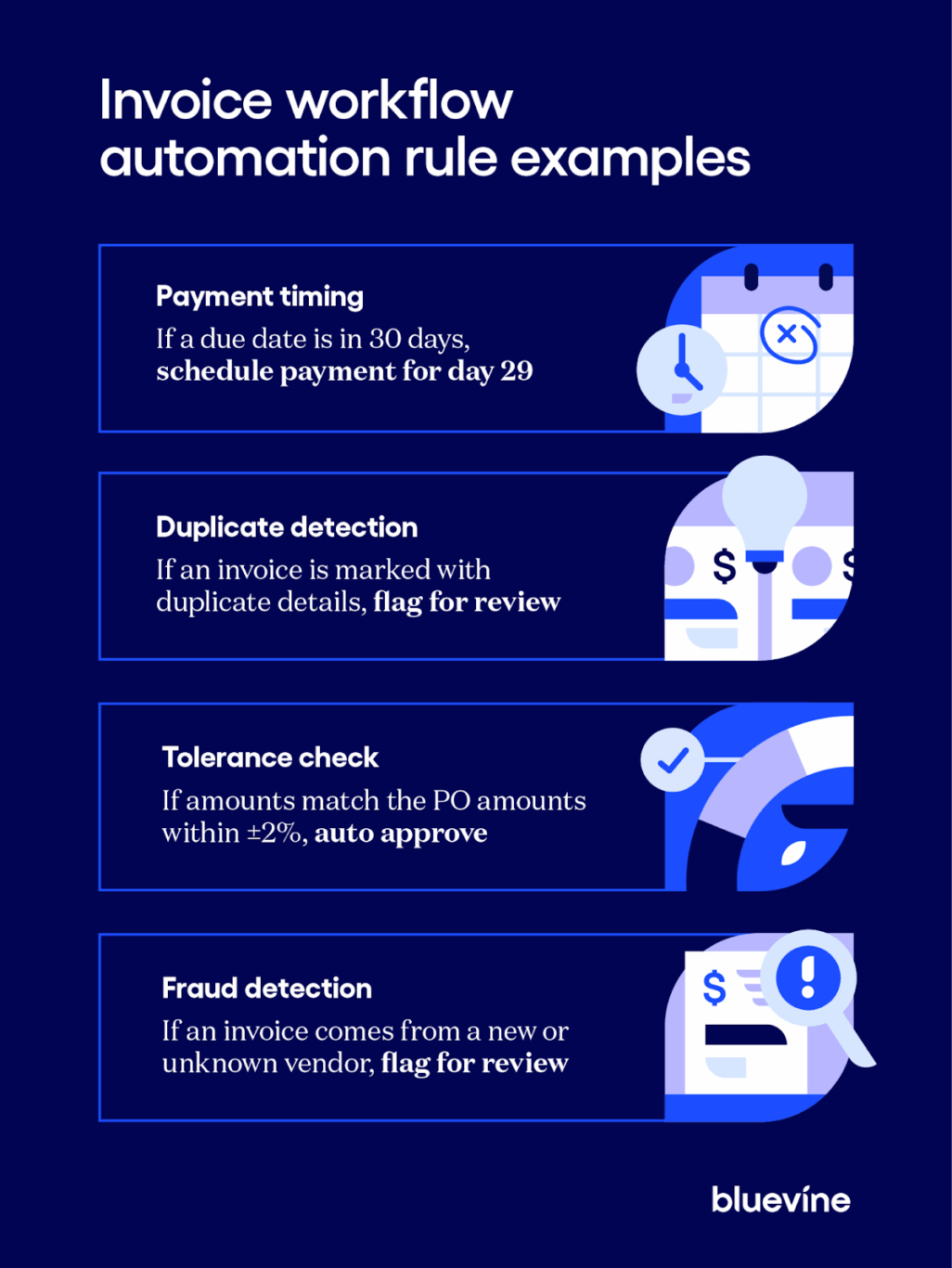
The best payment solutions for small businesses also let teams define routing and tolerance rules that guide the flow of invoices. That way, the system can automatically send invoices to the right approver based on amount, department, or vendor without any manual input or communication.
Teams can fast-track accurate invoices to automatic payment, while reviewing duplicate, materially erroneous, or potentially fraudulent invoices that the system flags. This lets users be more proactive and efficient in stopping outsized or unwarranted payments.
Payment and reconciliation
Once you’ve checked and approved invoices, an invoice workflow automation platform can schedule automatic payments or set up a reminder for a user to manually execute the payment.
You can then immediately log each payment into your accounting system with correct data, audit trails, and the accompanying bank transaction record. This can help you avoid common bookkeeping mistakes while significantly reducing the manual effort normally required.

Bluevine Tip
Integrate your automation platform with a vendor self-service portal that suppliers can use to check the status of their invoices. Automate the follow-up process on outstanding invoices by providing real-time status updates in a convenient, centralized dashboard.
6 benefits of invoice workflow automation
Implementing invoice workflow automation can bring a myriad of tangible benefits to your business, allowing you to focus less time on menial, repetitive tasks and more time on maximizing your profits.
Did you know?
Demand for this kind of automation is climbing fast. The 2026 Bluevine Banking Gap survey found that 39% currently use or want automated invoice reminders, and half said they either use or want AI tools that flag unusual or fraudulent activity, the most requested automation feature in the survey.
Interest spans other parts of the bill-pay process too: businesses reported using or wanting AI-assisted funding or credit decisions (42%), AI-powered expense categorization (37%), and automated payment scheduling (35%). Only 5% said they had no interest in any of these automated banking features, showing how mainstream automation has become for day-to-day banking tasks.
Here’s what some of the benefits of automation look like:
1. Cost savings
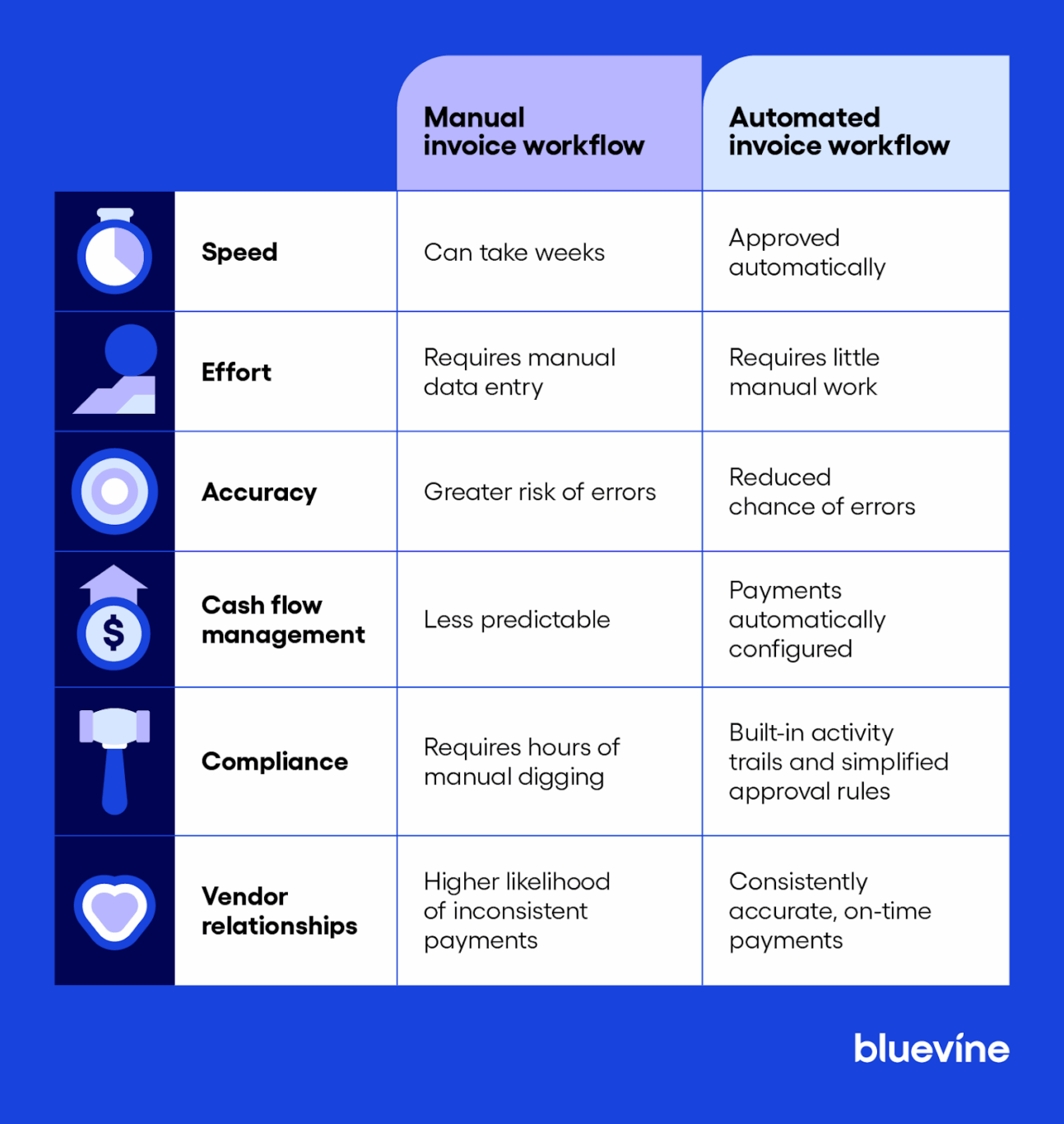
Invoice workflow automation can reduce the likelihood of making outsized, duplicate, or otherwise wrongful payments. It can also help you capture more early payment discounts and minimize the risk of incurring late fees.
You’ll also be able to improve your resource allocation by moving valuable labor hours away from repetitive busywork and towards profitable tasks.
2. Improved efficiency
With automated invoice processing, you’ll likely be able to reduce or remove bottlenecks and significantly cut invoice cycle times with quick approvals on valid invoices.
With more available time, accounts payable teams and finance leaders can focus their attention on correcting any errors with problematic invoices, communicating with vendors, or other value-additive tasks like cash flow management.
3. Reduced errors
Platforms that can accurately capture data in various formats can eliminate the need for manual data entry, greatly reducing the likelihood of common errors like incorrect invoice numbers, dates, or amounts.
4. Improved cash flow management
With an invoice automation system, you’ll gain real-time visibility into upcoming payments, likely indexed and categorized for your convenience. This can help you improve cash flow forecasting, which is critical for making informed business decisions.
5. Automatic compliance
Invoice automation platforms usually retain invoices and their relevant accompanying documents in a secure, categorized database. Additionally, they typically maintain granular activity logs that track approvals, decisions, and other invoice interactions.
Both of these features can help your team complete regulatory compliance checks efficiently, saving your team the pain of digging through long paper trails to find basic information.
6. Strengthened vendor relationships
When vendors have questions or bring up billing issues, your team can quickly reference centralized, easy-to-trace data in the invoice automation system and come back with fast answers.
Furthermore, payment scheduling automation can enable consistent, on-time payments, which could potentially open up opportunities for discounts or other preferential terms.
How to implement invoice workflow automation in 5 steps
Implementing invoice workflow automation in a way that maximizes value requires a careful, measured process. You’ll want to identify the bottlenecks in your manual invoice workflow that could be solved by automation, and select a platform that meets your requirements.
Once you’ve got your system set up, continuously test, refine, and monitor it until it achieves the intended effect—tangibly improving the efficiency, accuracy, and quality of your invoice workflows.
Step 1: Assess your manual process
Start by mapping your entire invoice workflow from beginning to end, using existing process documentation if available. Lay out everything in as much detail as possible, including how invoices arrive and which stakeholders interact with invoices. Also, make note of what procedures they follow, how payments are made, and what systems are involved.
Once you have the entire process mapped out, consult with your team to identify where delays and errors occur the most (like payment issues, data entry errors, and long approval processes).
With a full understanding of the bottlenecks and issues within your invoice workflow, you’ll likely be better equipped to find a platform that can address your specific needs.
Step 2: Choose your automation system
While invoice automation platforms tend to vary in the features they offer, there are some core capabilities you’ll want to look out for in order to solve bottlenecks and maximize the return on your investment. These include:
- AI/Optical Character Recognition (OCR): A combination of AI and OCR technology (often referred to as intelligent document processing) that enables the automatic extraction, analysis, and categorization of data from scanned documents, images, PDFs, and more
- Duplicate detection: The capability to flag and escalate duplicate or near-duplicate invoices to avoid double payments
- Workflow customization: The option to set customized confidence thresholds, tolerance rules, and approval routes that conform to your specific requirements
- Payment methods and options: The capability to schedule payments and pay bills automatically using a variety of different methods, like ACH, wires, checks, or cards, depending on vendor preference
- Fraud detection: The ability to automatically flag fraudulent invoices or unfamiliar vendors and send them to another level of review and approval to avoid making wrongful payments
Step 3: Configure integrations, workflows, and rules
Once you’ve found your platform of choice, the next step is to translate your manual invoice workflow into the platform. Start by connecting your platform with your existing apps, including your accounting, banking, and payment tools.
Once integrated, you’ll be able to:
- Set up approval routes that mirror your current process, ensuring that invoices are automatically sent to the right stakeholders
- Establish a rule that automatically schedules approved invoices for on-time payment using each vendor’s preferred payment method
- Set up validation rules and confidence thresholds so that the platform can cross-reference invoices against your internal records, flag and escalate potential issues to the appropriate stakeholders, and block payments until a manual review is complete
Step 4: Test and train
Before rolling out your invoice process automation system in full, take time to test it on a smaller scale and make sure it’s achieving the intended effects. Focus on the following:
- Running a pilot program with select vendors, invoice types, or departments to identify and resolve any potential issues ahead of full implementation
- Validating performance and results to ensure that data is being captured accurately, invoices are being routed appropriately, and payments are being scheduled as needed
- Creating clear process documentation, policies, and guidelines that describe how to interact with the system
- Training every relevant stakeholder so that they understand their specific responsibilities within the system and exactly how the change will benefit them
Step 5: Monitor and refine
Once fully implemented, create an open communication channel where staff can voice any feedback and receive timely support. Identify where the most consistent problems and bottlenecks are occurring (if any), and push changes to resolve them at scale.
Track performance metrics (similar to how you likely track key financial metrics) to ensure that the system is working with the intended quality and speed. Review the key metrics monthly, identify any areas that are performing below expectations, push changes within your platform or workflow where needed.
Bluevine Tip
To measure your invoice automation platform’s impact, establish and track KPIs, including average approval time, percentage of invoices processed without manual intervention, and average confidence rating for data extraction.
Tips for implementing invoice workflow automation
Implementing an invoice workflow automation platform can come with a number of challenges that you may need to address. Below are three of the most common ones and how to overcome them:
Verify data extraction capabilities
Problem: Partners can deliver invoices in various formats, from a wide variety of sources, and with unique errors that not every platform may be able to handle at scale. This can cut into the value of automation by requiring frequent manual corrections on automatically entered data.
Solution: If you can get a demo, ask the vendor to run tests using invoices that you actually receive. Confirm what it gets right, check for errors, and see if the tool implements confidence thresholds to expedite manual reviews where needed.
Build integrations with your platforms
Problem: Invoice workflow automation platforms work best when connected, and typically offer limited value when isolated. If the platform can’t integrate with your accounting, banking, and payment solutions, you may be losing out on further, deeper automations that could save you even more time.
Solution: Ask the vendor what native integrations they support and cross-reference them with the business platforms you already use. If they can’t integrate with your platforms of choice, consider finding a different vendor that does.
Ensure data security and privacy
Problem: You’ll likely be trusting a platform with invoices, vendor information, and banking details, each of which contain sensitive information. As a result, any security loopholes can lead to serious, sometimes irreversible consequences for businesses.
Solution: Ask the vendors about what privacy and security guarantees they provide. Look specifically for:
- Role-based access controls (RBAC)
- Enterprise-grade encryption (TLS 1.2+ and AES-256)
- Immutable audit trails
- Compliance with security regulations (like SOC 2, GDPR, CCPA)
- Zero data retention policies
Invoice workflow automation tools to consider
There are plenty of invoice workflow automation tools to consider. Some are purpose-built to automate the entire invoice processing workflow, while others automate significant individual parts of it. Below are some examples:
| Tool | Best for | How it helps |
|---|---|---|
| Bluevine | Small businesses, midsize businesses | Automates data capture, approval workflows, routing, and payment Supports payments via ACH, wire transfers, checks, and cards, both domestically and internationally Allows users to manage and pay bills from an all-in-one centralized dashboard Lets users schedule one-time or recurring payments up to one year in the future Integrates with QuickBooks Online for reconciliation and loggingBVSUP-00056 |
| Stampli | Mid-market accounts payable teams | Integrates seamlessly with ERPs to automate existing AP processes Automates data capture, coding, matching, approvals, and payment Provides an integrated vendor management solution Features an AI assistant that automates manual tasks Provides real-time analytics to measure performance |
| Tipalti | Companies with global suppliers | Automates invoice capture, matching, routing, approvals, and payments Integrates a self-service portal that lets suppliers choose payment methods, currencies, payment thresholds, and more according to their country Provides compliance checks with global rules and regulations Allows seamless payments across 200+ countries/territories and 120 currencies |
| SAP Concur Invoice | Enterprise | Automates invoice capture (from e-mail, hard copies, or digital copies), matching, approval routing, and payments Integrates with ERPs, accounting systems, and a variety of payment providers Provides real-time analytics for each invoice, including status updates, invoice processing times, and department or vendor-level spending patterns Unifies invoice, travel, and expense management into one system |
Streamline your invoice payment process with a business checking account
Invoice workflow automation takes the manual work out of invoice processing, from data capture and approval routing to payment and reconciliation.
With the right platform, your teams spend less time completing repetitive tasks and more time doing that work that actually matters.
Set yourself up for success by opening a Bluevine Business Checking account, which lets you centralize and automate your invoice payments. You can capture and store invoice and billing details, automate approval workflows, schedule method-agnostic payments, and keep your internal records up to date through integrations with various apps like QuickBooks Online,BVSUP-00056 Xero, and Expensify.
Easily manage your checking, accounts payable, and accounts receivable all in one place.
Invoice workflow automation FAQ
How can I measure the ROI of an invoice workflow automation system?
You can measure the ROI of an invoice workflow automation system by tracking KPIs on a monthly basis. Some important ones include average invoice processing time, number of invoices processed without any manual intervention, error rates, discounts captured, and late fees avoided.
Can invoice workflow automation platforms handle exceptions?
Yes, most invoice workflow automation platforms handle exceptions by flagging mismatched, incomplete, or fraudulent invoices and routing them to the appropriate person for manual review and resolution.
What role does AI play in automating invoice workflows?
In many ways, AI is the engine behind invoice workflow automation, allowing teams to capture time and cost savings at scale. In fact, AI use among Bluevine small-business customers grew by 50% between September 2025 and March 2026. With AI, teams can extract and validate data accurately, route invoices for approval or review depending on context, and make payments with little to no manual input.


