
You’re wrapping up a job or a sale, and your customer’s ready to pay—but you realize you don’t have a card reader or point-of-sale (POS) terminal handy. No problem, you don’t need one.
With Tap to Pay, you can now accept in-person payments directly into your Bluevine Business Checking account, right from your phone. No extra hardware, no setup delays. Just tap and get paid.
At Bluevine, we’re building an all-in-one financial platform for small businesses, and an important piece of the puzzle is being able to accept payments. That’s why we’re excited to introduce Tap to Pay, which complements the invoicing and payment links tools we released earlier in 2025, giving you a variety of simple, convenient ways to accept customer payments.
What you need to know
- Now, you can get paid directly to your business checking account via Bluevine invoices, payment links, and Tap to Pay.
- Tap to Pay is a fast, secure way to accept in-person payments via card or mobile wallet.
- With Tap to Pay, you can start accepting payments in minutes with just your phone—no extra hardware needed.

Easily accept in-person payments with Tap to Pay
Running a small business means juggling a lot of tasks, and chasing down payments shouldn’t be one of them.
Whether you’re constantly on the go, tired of storing customers’ card information, or just want to speed up payments, Tap to Pay gives you the flexibility to accept payments anytime, anywhere with just your phone. When a customer is ready to pay, neither of you should have to wait.
As we mentioned when we launched invoicing and payment links, being able to get paid directly into your checking account can be a game-changer for how you run your business. With this combination of financial tools, you can conveniently receive payments via credit and debit card, digital wallet, ACH direct debit, and more.

Did you know?
Once a payment lands in your account, you can start earning interest right away, as long as you’ve met any applicable activity requirements.BVSUP-00147 That means you’re earning annual percentage yield (APY) faster than ever before, without needing to move money around.
How it works: Start accepting payments in minutes
To stay true to our mission of simplifying banking for small businesses, we built our Tap to Pay tool to be super intuitive. Setup takes just a few minutes and no extra hardware.
Here are the basic steps:
- Make sure you have the Bluevine mobile app. If you don’t have it installed, download the latest version of the Bluevine app to your iPhone or Android mobile device to get started.
- Connect your Stripe account and enable Tap to Pay. If you don’t already have a Stripe account, you can easily create one from your Bluevine dashboard under Sales.BVSUP-00180 Once connected, enabling Tap to Pay on your device should be a breeze.
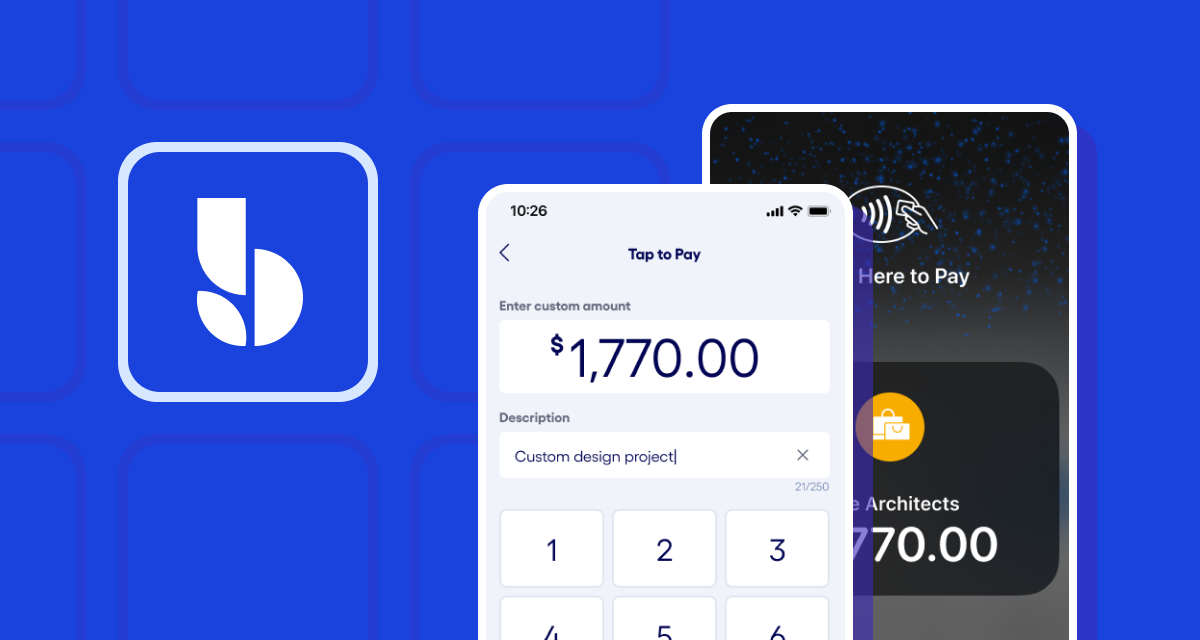
- Add a description and transaction amount. This helps log the transaction so you and your customer can easily see the product(s) or service(s) they’re paying for, plus the amount.
- Have your customer *tap*. Your customer taps their card or phone (using a digital wallet like Apple Pay or Google PayBVSUP-00196) to your phone.
- You get paid. Funds will be deposited into your Bluevine Business Checking account.
Every payment is encrypted and never stored on your device, so you and your customers can complete transactions with confidence. Plus, since your customer’s card never leaves their hand, Tap to Pay is one of the most secure ways to accept payments in person.
Why small business owners love Tap to Pay
Simply put, Tap to Pay is designed to make doing business easier. For business owners like you, it means fewer moving parts, less hassle, and more time back in your day.
Here’s why so many small businesses are already incorporating this technology into their day-to-day operations:
- No hardware needed: Accept payments from your phone—no reader, cables, or dongles necessary.
- Start immediately: Connect Stripe and enable Tap to Pay on your team’s devices to start getting paid in minutes.
- Secure by design: Your device stays in your hand, and your customer’s card or device stays in theirs. Plus, their card details are encrypted and never stored on your phone.
- Simple and transparent pricing: There’s nothing hidden about processing fees, so you always know what you’re taking home, whether you’re processing a card via payment link or Tap to Pay.BVSUP-00192
- Instant access to funds: Payments land directly in your Bluevine Business Checking account, where they can immediately start earning interest for eligible customers.BVSUP-00147
- All-in-one banking: Manage your incoming payments, accounts payable, and operating balances—all from the same place.
A powerful all-in-one business banking platform
Our addition of Tap to Pay isn’t just a more convenient way for customers to pay you faster.
Whether you’re sending a one-time payment link, setting up a recurring invoice, or getting paid on the spot, we give you the flexibility and control to get paid the way you want and run your business even more efficiently.
As the largest small business banking platform in the U.S.,BVSUP-00186 Bluevine helps bring all your financial tools together: checking, invoicing and incoming payments, bill pay, and access to working capital—all in one place.
Accept in-person payments directly to your business checking account, right from your phone.
Tap to Pay FAQs
What is Tap to Pay?
Tap to Pay is a way for you to accept payments directly to your Bluevine Business Checking account, by using your mobile device as a credit card terminal for contactless payments. Any payment method that uses contactless technology should be able to make mobile payments using Tap to Pay, including:
- Credit or debit cards
- Mobile wallets via phones and smartwatches, e.g. Apple Pay and Google PayBVSUP-00196
Do I need a Bluevine Business Checking account to use Tap to Pay?
Yes, you do need a Bluevine Business Checking account to accept in-person payments via Tap to Pay. You can apply for an account here for free in minutes.
Do I need a Stripe account to accept payments via Tap to Pay?
Yes, you will need a connected Stripe account to accept card and digital wallet payments into your Bluevine Business Checking account via Tap to Pay.
If you don’t already have a Stripe account, you can easily create one from the Sales tab in your Bluevine dashboard.
Which devices and terminals support Tap to Pay?
Bluevine’s Tap to Pay is available on your iPhone or Android device. It can accept payments from any contactless payment method, including credit or debit cards, mobile wallets on a customer’s phone, and wearables like smartwatches.
What are the fees or costs for accepting Tap to Pay payments with Bluevine?
There are no fees to set up Tap to Pay with Bluevine. Just pay Stripe processing fees of 2.7% plus $0.30 per transaction.
Is Tap to Pay secure?
Yes, Tap to Pay is completely secure. Your device never stores personal information, and all data is encrypted, similar to any other card or mobile wallet transaction.
Does Tap to Pay work with mobile wallets?
Yes, Tap to Pay works with mobile wallets such as Apple Pay and Google Pay.BVSUP-00196
Who is Tap to Pay best for?
Tap to Pay is a useful feature for many types of small businesses, including contractors, consultants, field service professionals, vendors, and anyone who needs a quick, secure way to get paid in person.


