Cross-border payments are no longer niche. Global cross-border payment flows exceeded $190 trillion annually.BVSUP-00199 Meanwhile, SWIFT processes more than 44 million financial messages daily.BVSUP-00200 For small businesses, that scale translates into everyday operational needs: paying overseas manufacturers, compensating international contractors, and collecting payments from global customers.
What are international payments for small businesses?
International payments for small businesses are cross-border transfers used to pay vendors, suppliers, contractors, or customers overseas — and to receive payments from international clients. With Bluevine, businesses can both send and receive international payments directly from their business checking account.
Bluevine allows clients to send international payments via USD and local currencies. Payments sent in USD rely on global messaging systems like SWIFT and correspondent banking relationships. If applicable, the receiving bank will convert the money upon receipt. In some cases, a correspondent bank may deduct a fee.
Payments sent in local currencies are paid out to international payees via their local payment networks. This reduces risk of:
- Unfair exchange rates—you'll see exactly how much will get sent before you ever make the payment. Bluevine also uses the mid-market exchange rate; no hidden fees are baked into the rate.
- Intermediaries deducting fees
- Delays
Additionally, for payees with U.S. bank accounts, Bluevine clients can send funds via ACH, Wire, and Checks.
With Bluevine, small businesses can:
Send payments
to 180+ countries and territories in 40+ currenciesBVSUP-00081
Receive payments
in 39 supported currencies, which are converted to USD upon receiptBVSUP-00143


Sending international payments
If you need to send international payments, Bluevine allows you to initiate the transfer directly from your Business Checking dashboard.
- Navigate to Send Payment inside your Bluevine dashboard
- Select an international payee (or add a new one)
- Choose the destination currency
- Review the exchange rate displayed before confirmation
- Confirm and submit
What are the fees for sending international payments?
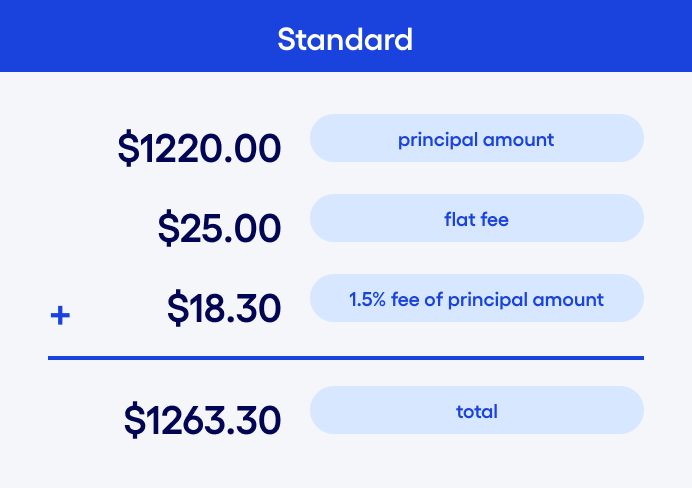
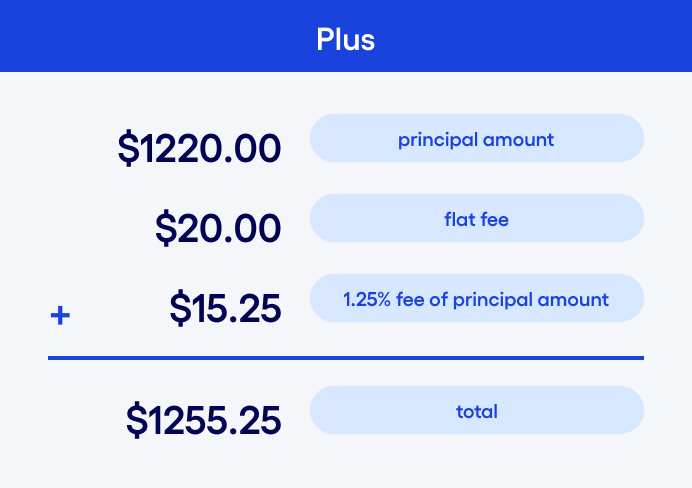
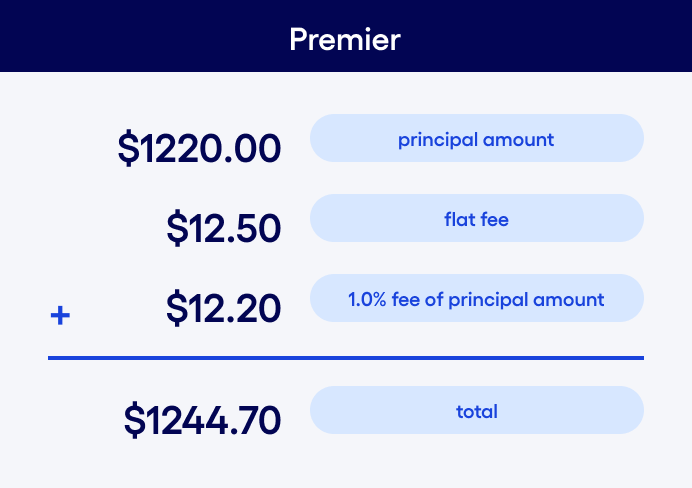
| Plan | Sent in USD | Sent in foreign currency |
|---|---|---|
| Standard | $25 per payment | $25 + 1.5% of payment |
| Plus | $20 per payment | $20 + 1.25% of payment |
| Premier | $12.50 per payment | $12.50 + 1.0% of payment |
 Standard
 Plus
Plus Premier
Exchange rates are displayed before you confirm your transfer, providing transparency into total cost.
How long does it take for international payments to be processed?
International wire transfers can arrive in as fast as 24 hours, depending on:
- Receiving bank processing time
- Cutoff times
- Destination country
Funds are sent during business hours (8am–5pm ET). Delivery speed may vary based on intermediary bank routing. For businesses managing global vendor payments, this provides predictability without requiring a separate international banking provider.
Which countries can I send payments to?
Bluevine supports outgoing payments to 180+ countries and territories including:
| Region | Countries |
|---|---|
| Africa | Algeria, Angola, Benin, Botswana, Burkina Faso, Cape Verde, Côte d'Ivoire, Egypt, Ethiopia, Gabon, Gambia, Ghana, Guinea, Guinea-Bissau, Kenya, Lesotho, Malawi, Mauritania, Mauritius, Mayotte, Morocco, Namibia, Niger, Rwanda, Réunion, Saint Helena, Sao Tome and Principe, Senegal, Seychelles, Sierra Leone, South Africa, Tanzania, Tunisia, Uganda, Zambia |
| Asia | Armenia, Azerbaijan, Bahrain, Bangladesh, Bhutan, Brunei Darussalam, China, Georgia, Hong Kong, India, Indonesia, Israel, Japan, Kazakhstan, Kuwait, Kyrgyzstan, Laos, Macao, Malaysia, Maldives, Mongolia, Nepal, Oman, Philippines, Qatar, Saudi Arabia, Singapore, South Korea, Sri Lanka, Taiwan, Tajikistan, Thailand, Timor-Leste, Turkey, United Arab Emirates, Uzbekistan, Vietnam |
| Europe | Andorra, Austria, Belgium, Bosnia and Herzegovina, Bulgaria, Cyprus, Czech Republic, Denmark, Estonia, Faroe Islands, Finland, France, Germany, Gibraltar, Greece, Guernsey, Hungary, Iceland, Ireland, Isle of Man, Italy, Jersey, Kosovo, Latvia, Liechtenstein, Lithuania, Luxembourg, Republic of North Macedonia, Malta, Moldova, Monaco, Montenegro, Netherlands, Norway, Poland, Portugal, Romania, San Marino, Serbia, Slovakia, Slovenia, Spain, Svalbard and Jan Mayen, Sweden, Switzerland, United Kingdom, Vatican City, Åland Islands |
| North America | Anguilla, Antigua and Barbuda, Aruba, Bahamas, Barbados, Bermuda, Bonaire, Canada, Cayman Islands, Costa Rica, Dominica, Dominican Republic, El Salvador, Greenland, Grenada, Guadeloupe, Guatemala, Honduras, Jamaica, Martinique, Mexico, Montserrat, Panama, Saint Kitts and Nevis, Saint Lucia, Saint Pierre and Miquelon, Saint Vincent and the Grenadines, Sint Maarten (Dutch part), Trinidad and Tobago, Turks and Caicos Islands |
| Oceania | Australia, Christmas Island, Cocos (Keeling) Islands, Cook Islands, Federated States of Micronesia, Fiji, French Polynesia, Heard Island and McDonald Islands, Kiribati, Marshall Islands, Nauru, New Caledonia, New Zealand, Niue, Norfolk Island, Palau, Papua New Guinea, Samoa, Solomon Islands, Tonga, Tuvalu, Vanuatu, Wallis and Futuna |
| South America | Argentina, Bolivia, Brazil, Chile, Colombia, Ecuador, Falkland Islands, French Guiana, Guyana, Paraguay, Peru, Suriname, Uruguay |
Eligibility may vary by industry and business location. International payments are not available to certain restricted countries.
Receiving international payments
Small businesses also need to receive international payments — from overseas customers, global partners, or foreign distributors. With Bluevine, incoming international wire transfers are deposited directly into your Business Checking account.
What information do I need to receive an international payment?
To receive funds, provide the sender with:
- Account name
- Account number
- SWIFT/BIC code: varies by country
 Account name
These details are available inside your Bluevine dashboard under Account Details.
Does Bluevine convert foreign currency to USD?
Yes. Incoming payments sent in one of 39 supported currencies are automatically converted into USD before being deposited into your account. This simplifies reconciliation because:
- You receive funds in U.S. dollars
- You avoid managing separate currency balances
- Your accounting remains centralized
What are the fees for receiving international payments?
Receiving fees vary by plan:
| Standard | $15 per received payment |
| Plus | $12 per received payment |
| Premier | $7.50 per received payment |
Funds are typically available in as fast as one business day, depending on the sending bank and country.
Which currencies can I receive?
Businesses can receive payments in 39 supported currencies including:
Asia:
AED
United Arab Emirates Dirham
BHD
Bahraini Dinar
CNY
Chinese Yuan Renminbi
HKD
Hong Kong Dollar
ILS
Israeli Shekel
JPY
Japanese Yen
KWD
Kuwaiti Dinar
OMR
Omani Rial
QAR
Qatari Riyal
SAR
Saudi Riyal
SGD
Singapore Dollar
THB
Thai Baht
Europe:
BGN
Bulgarian Lev
CHF
Swiss Franc
CZK
Czech Koruna
DKK
Danish Krone
EUR
Euro
GBP
British Pound Sterling
HUF
Hungarian Forint
NOK
Norwegian Krone
PLN
Polish Zloty
RON
Romanian Leu
RSD
Serbian Dinar
SEK
Swedish Krona
TRY
Turkish Lira
North America:
BBD
Barbadian Dollar
BSD
Bahamian Dollar
CAD
Canadian Dollar
JMD
Jamaican Dollar
MXN
Mexican Peso
TTD
Trinidad and Tobago Dollar
USD
United States Dollar
Oceania:
AUD
Australian Dollar
NZD
New Zealand Dollar
South America:
CLP
Chilean Peso
PEN
Peruvian Sol
Africa:
BWP
Botswana Pula
UGX
Ugandan Shilling
ZAR
South African Rand
All incoming funds are converted into USD before deposit.
Bluevine POV
International payments inside business checking
Bluevine believes international payments shouldn't require a separate banking relationship or third-party tool. For businesses paying vendors overseas or receiving payments from global customers, cross-border transactions should live inside the same dashboard as domestic payments.
By integrating international payments into Bluevine Business Checking, businesses gain:
- Centralized visibilityDomestic and global payments in one place
- Transparent pricingSimple, competitive pricing before confirmation
- Faster processing timesPayments in as fast as 24 hours
- Simplified compliance documentationStandardized routing and reporting


International payments are a natural extension of business checking—helping small businesses move money confidently across borders without added operational complexity. Bluevine displays the exchange rate before confirmation, so businesses can see:
- Total cost
- Converted amount
- Applicable fee
There are no hidden intermediary platform charges beyond what's shown in the dashboard. For small businesses operating on tight margins, that visibility reduces surprises in cross-border business payments.